

Bigasoft VOB to iMovie Converter for Mac

Easily import DVD movies in VOB, MPEG-2, AVCHD, ISO, MXF to iMovie
Description
Convert and import DVD to work with iMovie effortlessly and efficiently with Bigasoft VOB to iMovie Converter for Mac. iMovie just supports MPEG2, DV, HDV, QuickTime Movie and MPEG4. In order to import DVD movies to iMovie, you need to convert your DVD VOB, MPEG-2, AVCHD, MXF, ISO to one of the above video format (MPEG4 is recommended) with Bigasoft VOB to iMovie Converter and then you can import the converted DVD video to iMovie.
Bigasoft VOB to iMovie Converter assists you to convert DVD discs video to iMovie videos and audios such as MPEG 4 video (.mp4), iMovie HD Video MPEG4 (.mp4), MPEG-2 video (.mpg), QuickTime MOV, MP3, AAC, M4A and WAV. You may preview the movies before conversion, capture your favorite scenes, convert DVD segment, crop black margin, automatically turn off after long conversion, merge chapters, select audio track and subtitle you preferred, adjust the parameters to customize output effect, and more with the VOB iMovie Converter.
Free download Bigasoft VOB to iMovie Converter and make your innovative movies with unlimited footages right now!
Screenshots
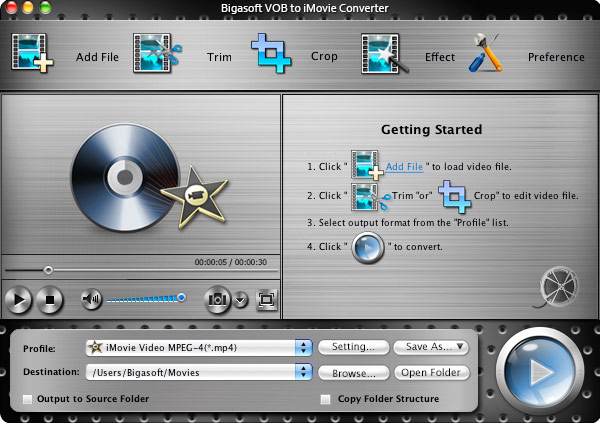
This is the main window of Bigasoft VOB to iMovie Converter for Mac
Key Features
- Import/Transfer DVD video to iMovie
- Bigasoft VOB to iMovie Converter enables you to transfer DVD including DVD5, DVD9, IFO, VOB, MPEG, MXF, ISO, AVCHD and more to iMovie by converting DVD video to iMovie MPEG4 video formats.
- Extract audio from DVD
- Easily extract DVD audio to iMovie MP3, AAC, WAV and M4A.
- Fast import to iMovie with high quality animation.
- Bigasoft VOB to iMovie Converter software helps to easily convert your DVDs from both homemade DVDs and commercial DVDs to MPEG 4 for import to iMovie '11, import to iMovie '09 or import to iMovie '08 with fast conversion speed with high quality animation.
- Preview and Take snapshot
- Preview the original DVD video with the built-in player and you can easily take still shots along the way and save as picture files like JPG, BMP, PNG, and more.
- Merge chapters
- Enable you to merge the selected chapters and titles into a single file.
- Provide adjustable setting
- Lots of adjustable video and audio settings such as resolution, frame rate, video bit rate, audio bit rate, sample rate and more are provided.
- Customize subtitle and audio track
- The powerful VOB iMovie Converter allows you to select target subtitle and audio track as you will.
- Crop DVD margin
- You can adjust the playing region of the DVD movies by this VOB to iMovie Converter.
- Support multiple languages
- Multiple languages are available including English, German, French, Spanish, Japanese, Arabic, and Chinese.
- DVD iMovie Converter for Mac OS X Mountain Lion
- Bigasoft VOB to iMovie converter for Mac is fully compatible with Mac OS X 10.4(Tiger), 10.5(Leopard), 10.6(Snow Leopard), 10.7(Lion), 10.8(Mountain Lion), and 10.9(Mavericks).
System Requirements
- Mac OS X 10.5(Leopard), 10.6(Snow Leopard), 10.7(Lion), 10.8(Mountain Lion), or 10.9(Mavericks).
- PowerPC® G5 or Intel® processor;
- 512MB RAM or more
- 50MB free hard disk space for installation
- Super VGA (800 x 600) resolution, 16-bit graphics card or higher
- DVD-ROM drive
Awards
 |
 |