Have questions about a Bigasoft product? Through the following Frequently Asked Questions we hope to address many of our most frequently asked questions. Still can't find the answer? Please feel
free to contact us with your questions.
Q:How can I get the free trial version of the software?
A: Download the software you want from our website and install it. When you use the software, a registration request window will pop up. Please ignore it and directly
click Later button, and then you get the trial version.
Q:How to buy?
A: Here is a step by step tutorial introducing you to purchase a license from Bigasoft official site.
-Open product page at http://www.bigasoft.com
- Click "Buy Now" button on the top-right of the product page.
- Please fill the "Order Form" to continue.
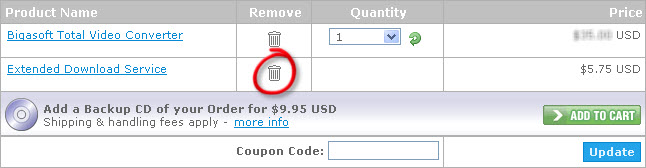
-You may remove "Extended Download Service" before ordering by simply clicking "trash" button to save more.
- You will receive your license code once you finish the order.
Q:How to report bugs?
A: Please send email to:
Q: What happens after I send the order? How could I get the license code?
A: Normally, you will receive your registration information in a few minutes after sending the online order form.
If you do not receive your registration information within 12 hours, or you have lost the registration email, please contact us at . We will be very glad to help you.
Q:I have not received my registration information. Why?
A: In some cases, there is a processing delay. For some other cases, people may have submitted the wrong email address. In rare cases, the registered users are
unreachable due to invaild email account or email privacy filter software. Please feel free to email to . We'll resend you register information soon.
Q:Can I buy the Backup CD and how long can I get it?
A: Yes, you can order a Backup CD of each product. But you can't buy the Backup CD only.
Just add the CD into your shopping card to buy it.
If you order the CD via SWREG or RegNow, please contact:
SWREG: swreg-clientsupport@digitalriver.com
RegNow: accounts@regnow.com
Q:What shall I do to purchase the Backup CD if I didn't buy it with the
software?
A: You can purchase the software with the Backup CD again. When you finish your second purchase, Bigasoft will refund your first order to you.
Q:Do I have to wait for the CD to begin using the software?
A: You don't have to wait for the CD. You order the downloadable version of the software at the same time you order the CD. You can download the software from our
website to use it at once. Please use the registration information you get from the confirmation letter to register the full version of the software.
Q:If I purchase your software, can I upgrade it for free in the future?
A: You can always get normal update version of the software for free. You can get the update version from our website.
Your original license code is still valid for the update version. As of the upgrade, it is paid one. If you need the upgrade version, please contact us to get upgrade link. Previous users can get a
preferential price to upgrade their software.
Note: License code you purchased for the old version is invalid for the upgrade version.
Q:How to register my software?
A: After you purchase the software successfully, you will receive registration information via Email within one business day. Download the software you bought from
our site and run it. Click "Register..." in "Help" menu, enter your name and license code in the corresponding box to finish the registration. Note: since the license code is letter-sensitive, please
COPY and PASTE the code. And don't add any blank before or after it.
Q:I entered the license code you sent me, but the software said "Invalid
registration info!". Why?
A: If the registration failed, it may be an invalid license code or an invalid format. You probably have missed or added a charcter. Just copy and paste the license
code.
Q:Wrong Purchase.
A: If you use a Windows, please purchase under this icon in our official website
www.bigasoft.com.
If you use a Mac, please purchase under this icon in our official website www.bigasoft.com.
Q:How long will it take to get your supporting response?
A: We promise to answer you within 24 hours. But in most cases you'll get our response in a few hours.
Q:I lost my license code, can you send it again?
A: Sure. Please write to us at , and please enclose your order related information (such as Order ID, E-mail address and name you used when you purchased etc.) which will enable us to find your order in our database in
time.
Q:I get a new computer, what should I do to move the software I purchased to the
new computer?
A: First please uninstall the software from your old computer. And then download the version you purchased from our website at http://www.bigasoft.com/downloads.html or use the CD you purchased to install it on your new one. Use the registration information you got before to register the full
version.
Q:Do I need to re-register after I re-install the software?
A: Yes. You need to re-register after you re-install the software.
Q:Am I entitled to a refund?
A: You can find certain conditions to apply for a refund here.
Q:Do I have to purchase the "Extended Download Service" (EDS)?
A: The short answer is NO. The item "Extended Download Service" is provided by RegNow.
Retrieving the download and your registration information is completely free of charge once you purchased any product from Bigasoft. The only concern for you is that Bigasoft always keeps the latest
version of the product on our server. If you need to download the very old version when you purchased at any time, then you can add this extended download service as a plus.
When you order a product, it is automatically added to your basket. We suggest you remove it before ordering by simply click "trash" button to remove it to save money.
Q:How to use coupon code?
A: Click "Buy Now" button at product page, and click "Order Now" button, you will find the "Coupon Code" box. Fill
your coupon code in the box, something like BIGA-ABCD, and click "Update" button.




 in our official website
www.bigasoft.com.
in our official website
www.bigasoft.com. in our official website www.bigasoft.com.