

Bigasoft VOB to WebM Converter for Mac

Best and simplest VOB to WebM solution with flexible video editing!
Description
Bigasoft VOB to WebM Converter for Mac is the first DVD converter software for WebM on the internet which helps to create WebM from DVD movie on Mac OS X (WebM consists of VP8 video and Ogg Vorbis audio). With the simple, easy-to-use yet professional Mac VOB to WebM Converter, you can fast convert VOB to high-definition WebM video, standard-definition (SD) WebM video or lower resolution WebM video (under 640*480 pixels) to meet your various demand to upload to websites or for HTML5 video. Mac VOB to WebM Converter offers various advanced editing functions to customize output WebM video like video trimming, cropping, merging, previewing, taking snapshot, and more.
The powerful DVD WebM Converter for Mac OS can also convert DVD movies to popular videos such as convert VOB to MP4, MOV, H.264, AVI, DivX, Xvid, WMV, FLV, MKV, 3GP, MOD, RM, MTS and extract audio and music and save as MP3, M4A, WMA, AAC, WAV. With it, you can backup your DVDs on your Mac or playback on personal computer and almost all portable devices including iPod, iPhone, iPad, PSP, Smartphone, mobile phone and so on.
Free download Bigasoft VOB to WebM Converter for Mac for free trial and turn your DVDs to WebM file easily!
Screenshots
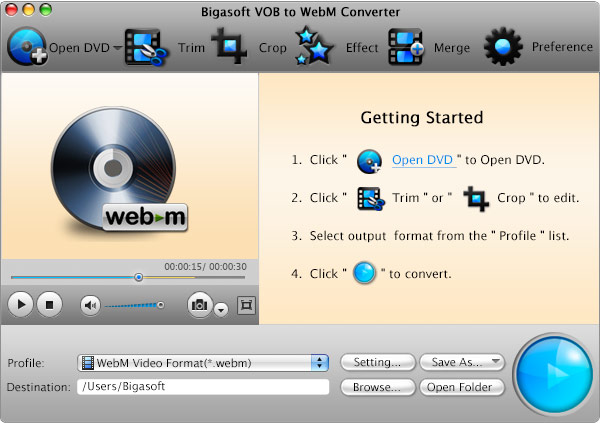
This is the main window of Bigasoft VOB to WebM Converter for Mac
Key Features
- Bigasoft VOB to WebM Converter for Mac typical applications:
- VOB to WebM - Convert VOB to WebM for uploading to websites and for HTML5 video
- VOB to VP8 - Convert VOB to VP8 for HTML5 video
- VOB to MP3 - Convert VOB to MP3 for enjoying DVD music and audio anywhere
- VOB to iPod, iPhone, iPad - Convert VOB to iPod, iPhone, iPad MP4 and MP3 for enjoy wherever and whenever you are.
- VOB to PSP - Convert VOB to PSP for enjoying movie on PSP
- VOB to Mac - Convert VOB to Mac for Backup on Mac
- Offers advanced settings for defining desired WebM video quality and editting WebM video
- "Trim" feature allows you to trim off unwanted part by setting the start and end time;
- "Crop" feature allows you to remove black bars or focus or customize video screen to focus video;
- "Merge into one" feature allows you to merge DVD chapters into integrated one file.
- Customize video and audio resolutions
- You can just use our default parameter setting to convert VOB to WebM (normal video and audio quality) or you can choose to set by yourself to customize the video and audio quality. You may set higher or lower video resolution and set the video and audio bitrates.
- Take snapshot
- Want save your favorite screen from the movie? It is possible with the DVD Converter for WebM. You may take images of the DVD movie and save as JPG, BMP or PNG.
- Enable to convert DVD folder and ISO file
- VOB to WebM can not only convert VOB to WebM but also can convert DVD folder and ISO file to WebM.
- Easy-to-use
- The interface of the DVD WebM Converter is clear and neat with commonsense image to guide you the conversion and custom setting. Just drag the VOB to the software, click "Convert" button. It's so easy. You won't miss it.
- Fast conversion speed
- The Mac VOBto VP8 Converter offers blazing fast conversion speed and what's more it can auto detect your CPU to provide higher conversion speed.
- Provide after done action
- You can choose the after done action in the "Preferences" pop up then start VOB to WebM conversion and your Mac will automatically shut down after the converting task is finished.
- Support Multilanguage interface
- English, German, French, Spanish, Japanese, Arabic, and Italian, Chinese are all supported by VOB to WebM Converter for Mac.
- Designed for Mac users
- The ideal OS X DVD conversion software for WebM is compatible with Mac OS X v10.4(Tiger), 10.5(Leopard), 10.6(Snow Leopard), 10.7(Lion), 10.8(Mountain Lion), and 10.9(Mavericks).
System Requirements
- Mac OS X 10.4(Tiger), 10.5(Leopard), 10.6(Snow Leopard), 10.7(Lion), 10.8(Mountain Lion), and 10.9(Mavericks).
- PowerPC® G5 or Intel® processor;
- 512MB RAM or more
- 50MB free hard disk space for installation
- Super VGA (800 x 600) resolution, 16-bit graphics card or higher
- DVD-ROM drive
Awards
 |
 |