

How to make iPhone ringtone longer than 40 seconds
Say NO to 30 seconds or 40 seconds limitation
September 14th, 2012 by Bigasoft Support
Tags: iphone ringtone, iphone ringtone maker, itunes, 30 seconds, 40 seconds, iphone 5, iphone 4s, iphone 4, iphone 3g, iphone 3gs
Background
All ringtones in iTunes must be 40 seconds or less in length. For example, if your ringtone is 60 seconds long, it will not be recognized by iTunes as ringtone (all the ringtones shows up under iTunes sync settings for Ringtones).
Is it really impossible to break the 40 seconds limitation of iPhone ringtone? Of course NOT. Here is a step to step guide on how to make ringtone longer than 40 seconds. It's dead easy.
This article works for all types of iPhone, including iPhone 5S, iPhone 5C, iPhone 5, iPhone 4S, iPhone 4, iPhone 3GS and iPhone 3G.
Firstly, you need make a short ringtone and hire iTunes to sync for you.
Free download and install Bigasoft iPhone Ringtone Maker (for Windows, for Mac), and then launch the software.

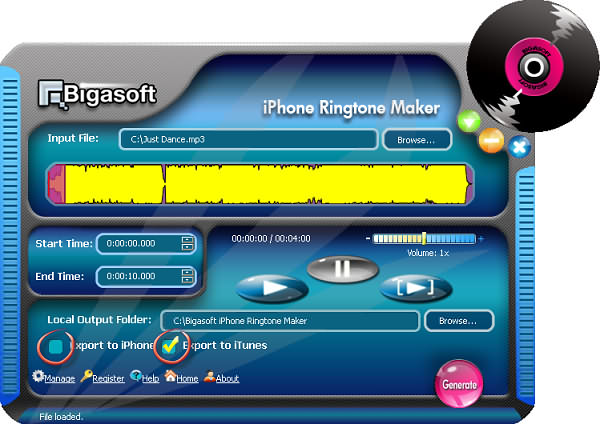
Locate the song you want to make into a long ringtone in your music collection or in iTunes. Drag the song to the iPhone ringtone maker.
Make sure the duration of ringtone is less than 40 seconds.
Uncheck "Export to iPhone", check "Export to iTunes", and click "Generate".
Step 2 Sync with iTunes
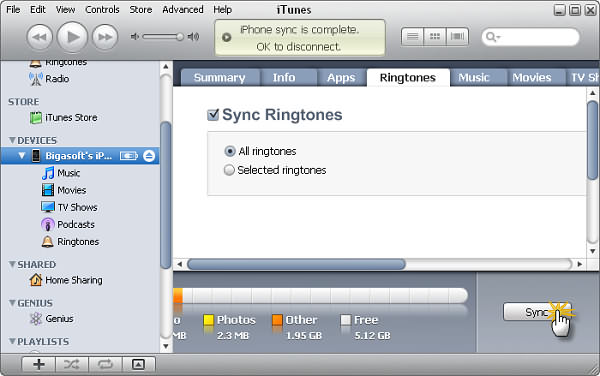
Connect iPhone to your computer, open iTunes if it doesn't automatically open, select the iPhone icon in the Source pane, click the Ringtones tab and then make sure the "Sync Ringtones" option is checked.
Click the "Sync" button in iTunes.
Step 3 Make a long ringtone
Set the Start Time and the End Time by drag and release on slider to where you want to go over the 40 seconds limit.
Please uncheck both "Export to iPhone" and "Export to iTunes", and click "Generate".
The ringtone maker software will generate a long ringtone for you.
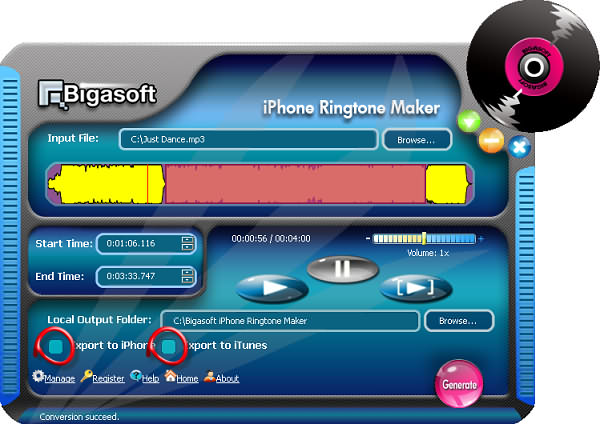
Step 4 Break the 40 seconds limitation!
Click "Manage", select the name of short ringtone, and click "Replace" button.
Locate the long ringtone generated by Step 3; the file name is something like "Just Dance(1)", and click "Open".
It's that simple.
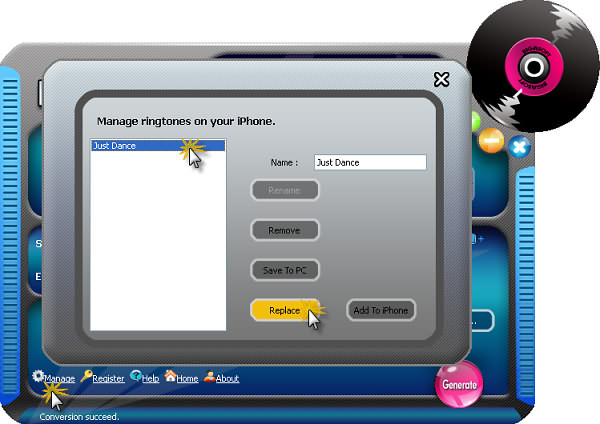
Step 5 Enjoy your iPhone ringtone
Tap on the "Sounds" icon in the Settings menu in your iPhone, then tap on the "Ringtone" icon, you can see a list of your available ringtones. Your new custom ringtone made with Bigasoft iPhone Ringtone Maker stays there. Enjoy the ringtone longer than 40 seconds now!
Resources
FREE Download and Start Enjoying Now (8.40MB)
Learn more about Bigasoft iPhone Ringtone Maker ...
Got a Mac? Free download your copy here (20.00MB)
Learn more about Bigasoft iPhone Ringtone Maker for Mac ...
More Articles on Bigasoft.com ...
To find out more Bigasoft Solutions to enjoy your new digital life, you can go here.